How MCRM LIVE Collects Text Message Opt-In
MCRM Crew Ops is a private crew scheduling and timekeeping tool operated by MCRM LIVE LLC for its own crew members and contractors. It is not open to the public. Accounts are created by a manager and the application is behind a login, so there is no public sign-up form. This page exists so that carriers and messaging reviewers can verify our opt-in process without an account.
1. Who receives messages
The crew members and independent contractors on our roster who work live events for MCRM LIVE LLC. We do not message anyone else. We do not send marketing, promotional, lead-generation, or affiliate messages, and we never message on behalf of a third party.
2. How consent is collected — verbal only
Verbal opt-in is the only method we use. There is no web form, no keyword opt-in, and no paper form. When a crew member joins our roster, an MCRM LIVE manager asks them in person or by phone and reads the following script.
3. The verbatim script · v1 (Jul 2026)
“Can MCRM LIVE text you about work? You'd get availability requests, booking confirmations, and call times for your shows, sent from (725) 433-6276. Message frequency varies, typically a few messages per month. We never send marketing or promotional texts. Message and data rates may apply. Reply HELP for help or STOP at any time to stop the texts. Saying no, or opting out later, won't affect your work; we'll email or call you instead. Our SMS terms are at https://crew.mcrm.live/terms and our privacy policy is at https://crew.mcrm.live/privacy. Do you agree to receive these text messages?”
The crew member must answer yes. If they decline, we contact them by email or phone instead, and it has no effect on whether they are hired, booked, or paid. Consent is given directly to MCRM LIVE LLC for this messaging program only. It is not part of, and is never bundled into, any contractor agreement.
4. Where consent is recorded
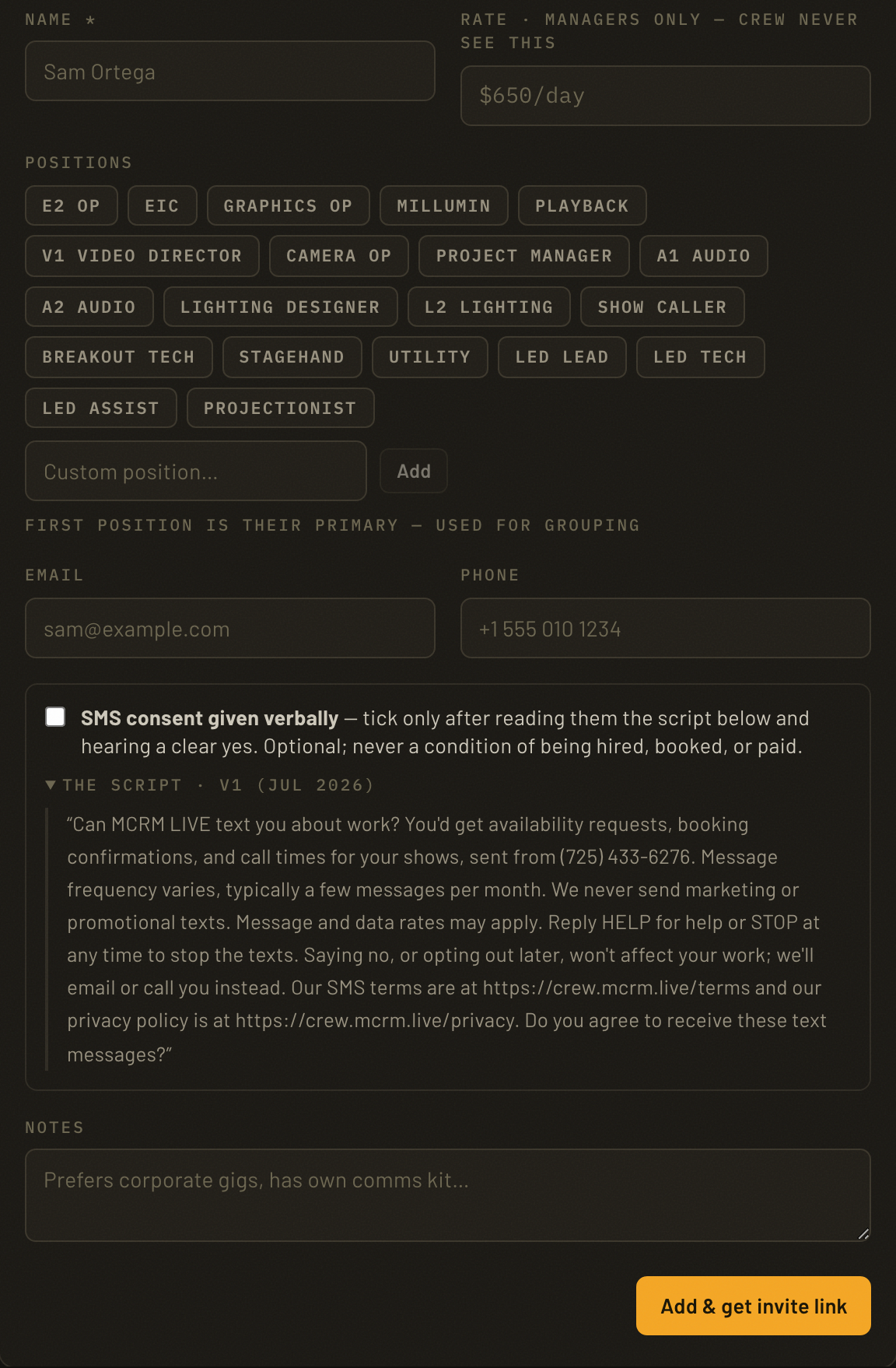
The consent checkbox is unchecked by default. A manager may only tick it after the crew member answers yes to the script above. When it is ticked, the system stores: the crew member's name and mobile number, the identity of the manager who collected consent, the version of the script that was read, and the date and time consent was given.
Opt-out is recorded the same way. Replying STOP to any message stops all texts immediately; a crew member may also ask any manager to remove their number at any time.
5. Sample messages we send
- MCRM LIVE: Phillip with MCRM. Are you available for [Show Name], [Aug 2-19, 2026] at [Venue] in [City]? Reply here: https://crew.mcrm.live/r/[code] Msg frequency varies; msg & data rates may apply. Reply STOP to opt out, HELP for help.
- MCRM LIVE: Phillip with MCRM. Can you please update your general availability between [Sep 1-30, 2026]? https://crew.mcrm.live/c Reply STOP to opt out, HELP for help.
- MCRM LIVE: Phillip would like to hold you for [Show Name], [Aug 2-19, 2026]. Confirm or decline: https://crew.mcrm.live/a/[code] Reply STOP to opt out, HELP for help.
- MCRM LIVE: You're confirmed as [Role] for [Show Name], [Aug 2-19, 2026]. Please reconfirm your dates: https://crew.mcrm.live/a/[code] Reply STOP to opt out, HELP for help.
6. Policies
SMS Terms & Conditions: crew.mcrm.live/terms
Privacy Policy: crew.mcrm.live/privacy
Contact: info@mcrm.live